
Admin console redesign
How do you “single case study” your favourite 2-year project? I couldn’t. So I made a mini anthology: a collection of real design moments from my time at SkoolBag.
COMPANY
SkoolBag (communication platform connecting schools and parents)
ROLE
Lead UX/UI Designer
DURATION
2 years
TEAM
FE Devs, BE Devs, QAs, PM, UX, CX
PROBLEM
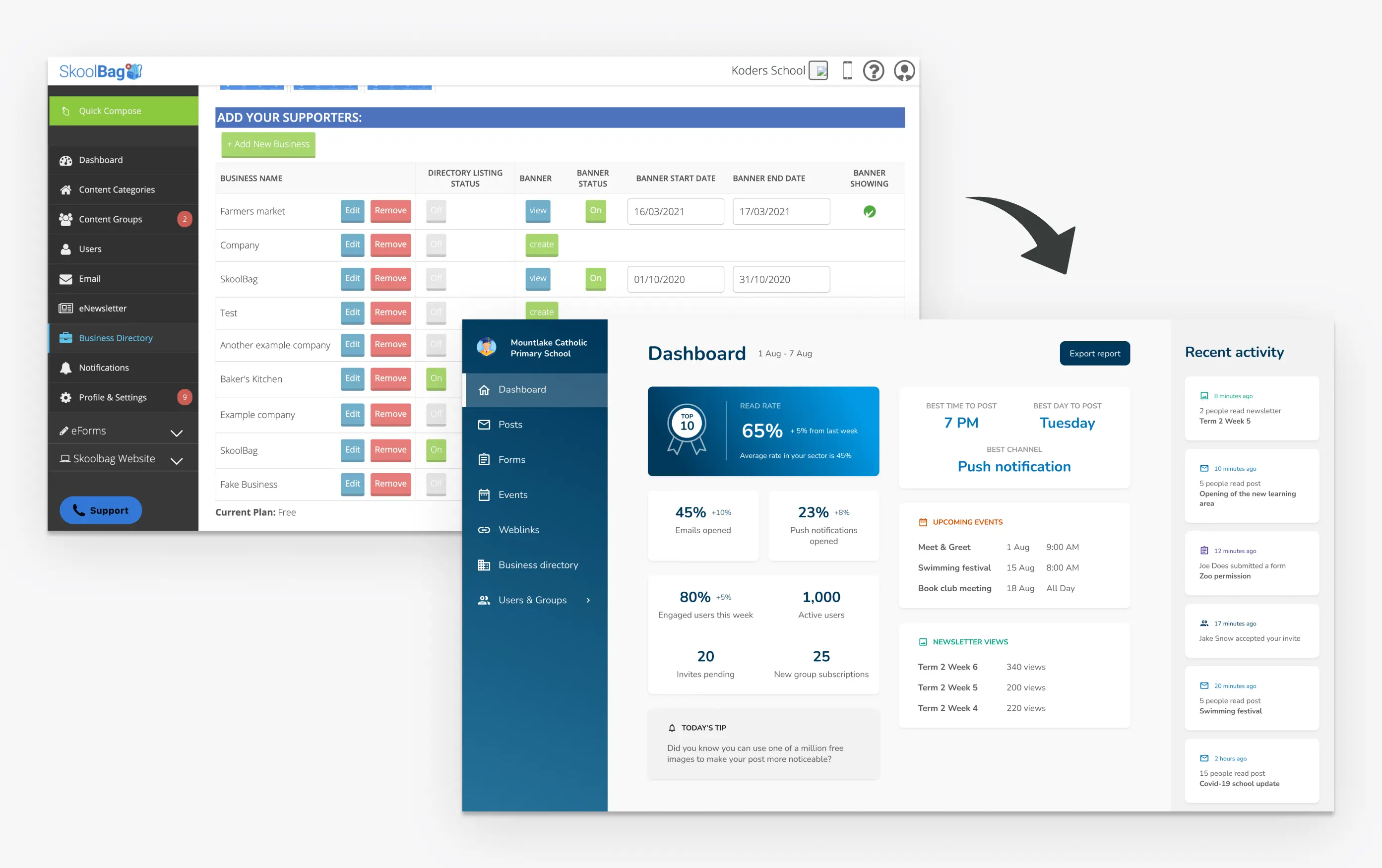
The business needed to cut costs, expand features and enable new partnerships, which required migrating the old backend and rebuilding the entire school admin console.
SOLUTION
A new, modern School Admin Console.
IMPACT
- Migrated 1,000+ schools to a new console without loss of functionality.
- Increased adoption of key features by 25%.
- Enabled new revenue streams and partnership opportunities.
My role & influence
- Lead Product Designer for the School Admin Console
- Owned end-to-end design across discovery, UX and UI
- Created user flows, prototypes and component specs for multiple squads
- Partnered with PMs and tech leads to define priorities and scope
- Acted as Product Owner when needed, prioritising backlog and defining requirements
- Facilitated design reviews and supported dev during implementation
- Improved handoff efficiency and design consistency across teams
- Advocated for lean, iterative delivery and design maturity practices
SkoolBag book of stories
SkoolBag was a scrappy B2B2C startup connecting schools and parents.
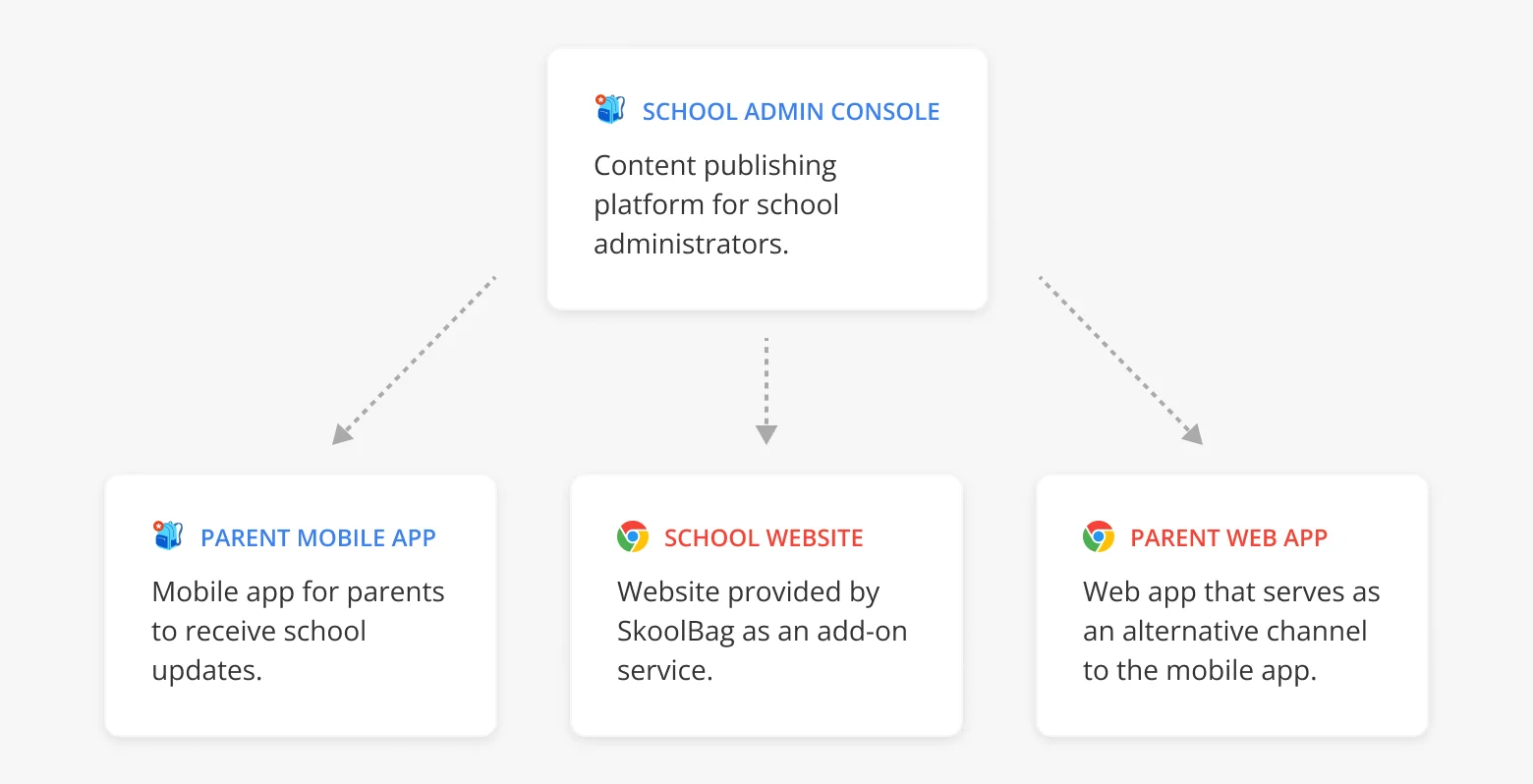
The business needed to cut costs, expand features and enable new partnerships, which required migrating the old backend and rebuilding the entire school admin console.
SkoolBag proved to be the ideal setting for me. I thrived in the startup pace, working with a lean team and tight deadlines. It was the kind of environment where I do my best work.
bookmarkThese six stories show the real side of design leadership in a startup.
Design process
The overall approach followed a lean double-diamond pattern:
- Rapid discovery
- Hypothesis framing
- Ideation
- Validation
- Delivery
- Iterations
Each story below represents one decision point in that cycle: identifying a real problem, reframing it, testing ideas and measuring impact.
Convincing stakeholders
The main way schools communicate with parents is through a newsfeed of posts.
Our analytics showed that posts with images had significantly higher open rates. But most schools struggled to source quality pictures and often requested guidance from our support team.
bookmarkThe challenge was that the business saw images as “nice-to-have”.
What helped to convince them:
- Showed them data proving higher engagement
- Highlighted support costs from image-related tickets
- Proposed an easy MVP: 5 Unsplash image options based on the post title
- Reframed it as a market differentiator, not a design tweak
That mix of clear data, small build effort and real business value convinced them to go ahead with it.
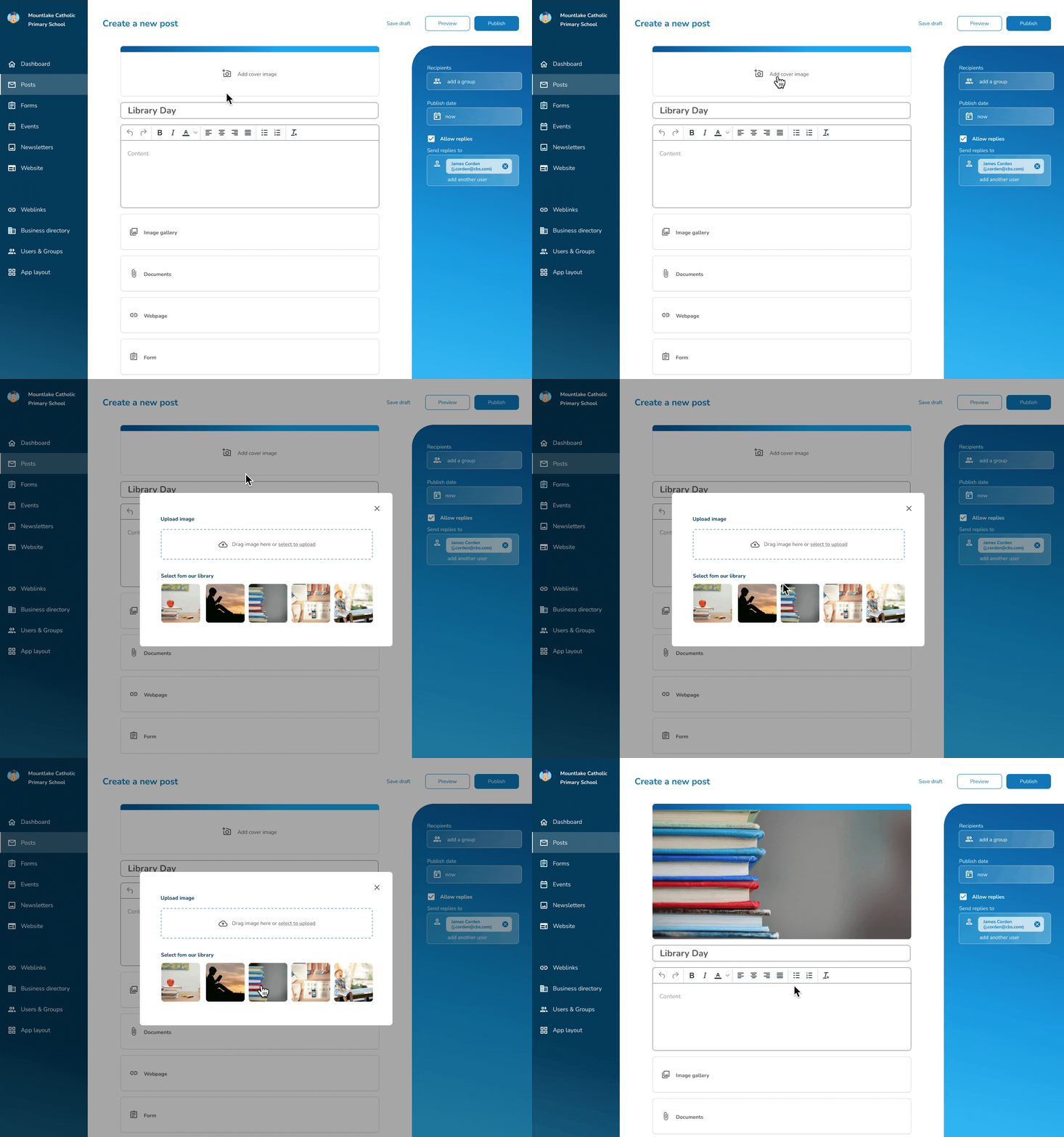
Adoption was great!
- Within the first month, over 50% of posts used a suggested Unsplash image
- Post engagement rate for schools using the feature increased
- Schools requested more image options after launch
- Image-related support requests dropped significantly
Further iterations
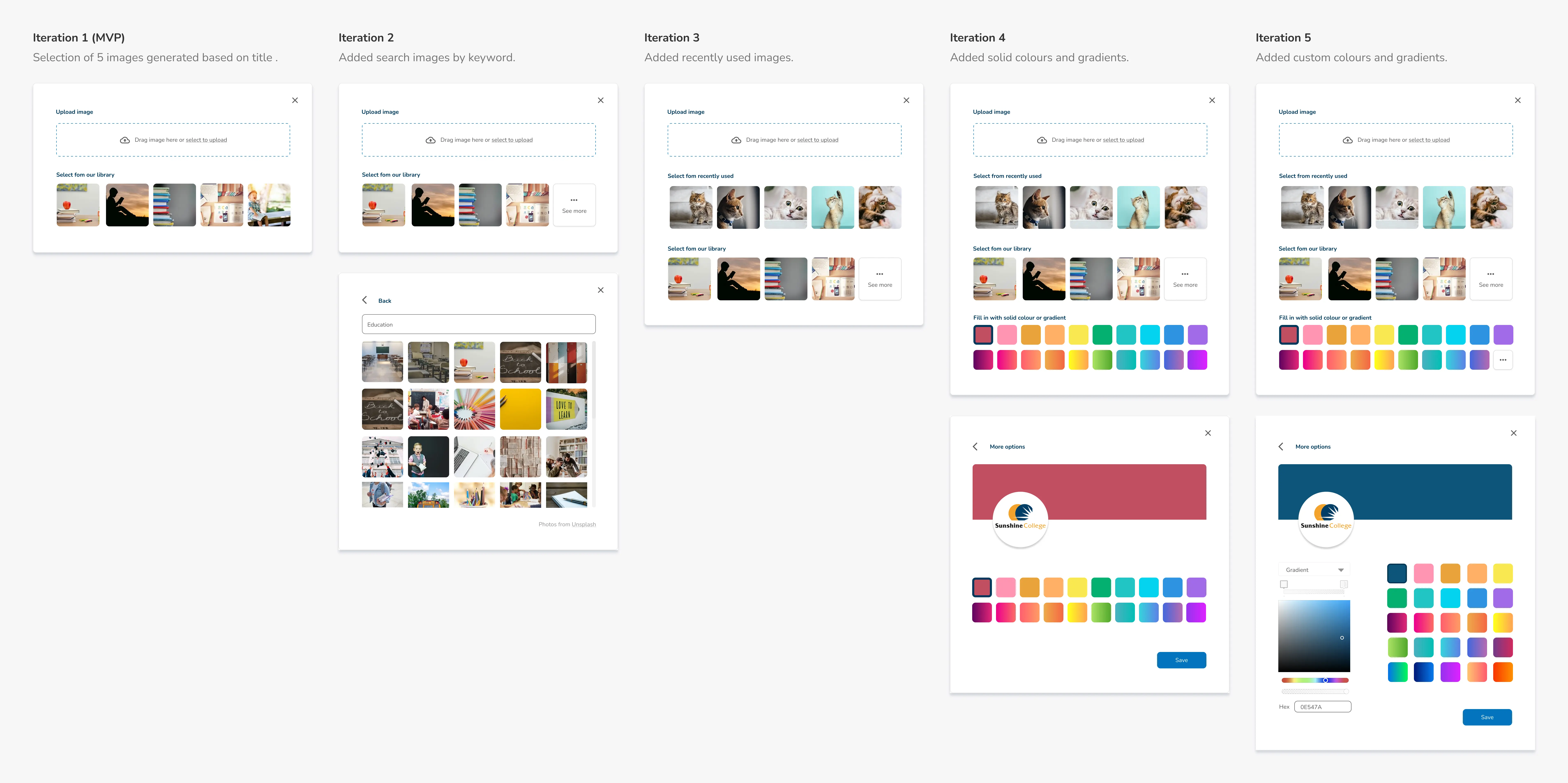
The feature was widely adopted and quickly became part of nearly every post. Some schools even cited this feature as a reason they preferred SkoolBag over alternatives.
Strategic scoping
Our Legacy console's form builder supported complex conditional logic for every field.
bookmarkPM wanted to rebuild the entire feature in the new console.
My goal was to avoid a large, slow rebuild that would cost a significant engineering effort without guaranteed value.
I needed to find a version of the feature that solved the most common use case quickly.
- Upon analysis, I found that conditional logic was almost always used for one specific scenario of “Contact Us” rerouting (e.g. teacher email).
- I proposed simplifying the scope to focus on that scenario and leave complex branching for a later phase.

This approach delivered 80% of the value in 20% of the time.
It covered the primary user needs immediately while enabling a more advanced logic later.
Failed edge case
In the legacy version of SkoolBag, when a user created an event, it automatically appeared in the parents’ app newsfeed.
In v2, backend changes meant events no longer showed up in the newsfeed.
This frustrated school admins, who relied on event posts to grab parents’ attention.
While redesigning this feature, I got an interesting edge case: What happens when an event is shared after it’s been edited but not yet saved?
Initial solution
- We assumed that if changes weren’t saved, they probably weren’t meant to be shared, since many admins create events in bulk early in the year and then leave them untouched.
- Data showed unsaved edits were rare, so we shipped a faster solution optimised for the majority.
The system would share the most recently saved version and ignore any unsaved edits.
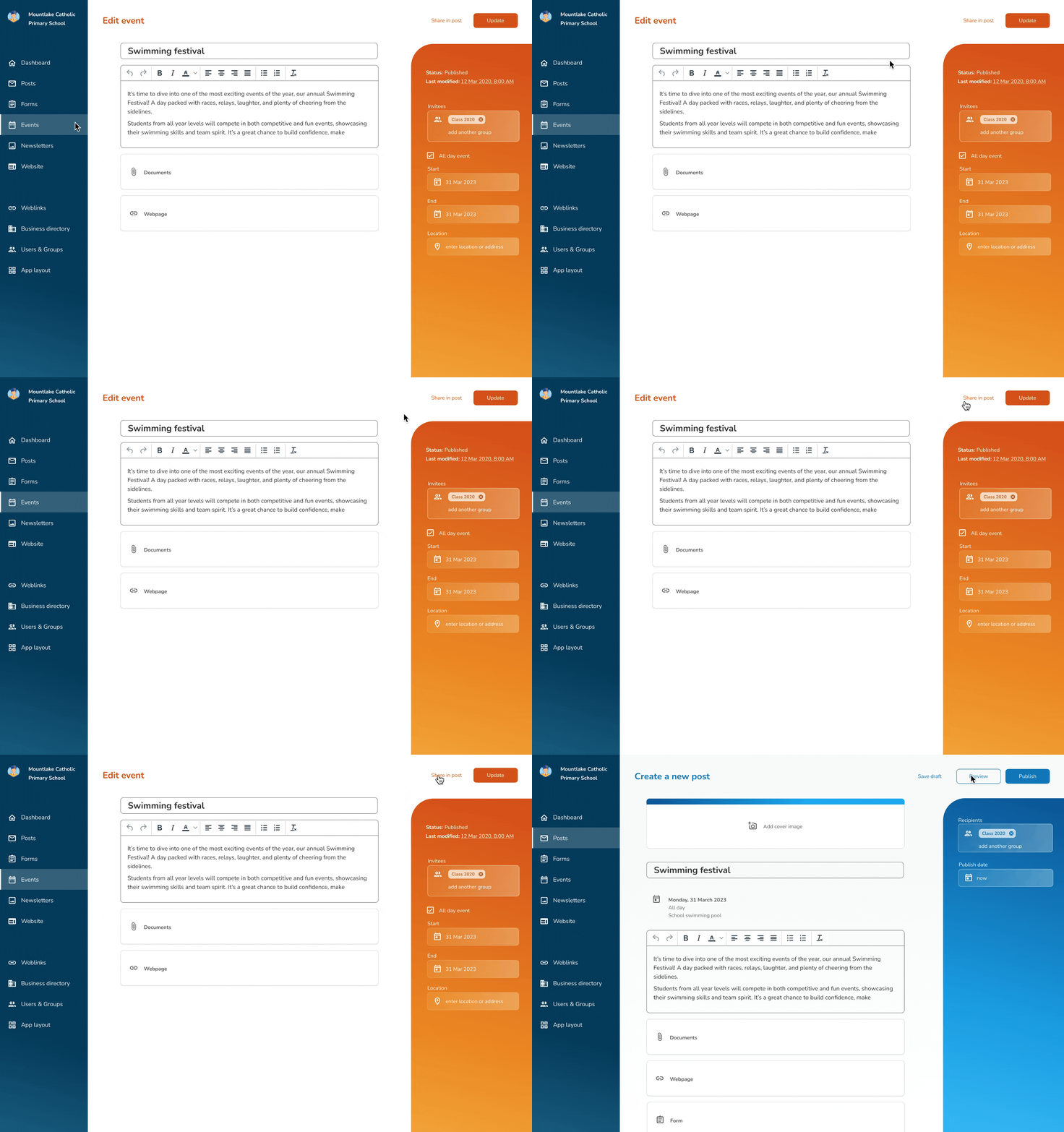
Users quickly complained that they were losing all their changes.
Even though data told us the edge case was small, it didn’t show how frustrating it was when it happened.
bookmarkIt’s not only how often it occurs, but how painful it is when it does.
Iteration
We added a confirmation prompt when a user shared an event with unsaved changes. This restored control and trust.
I worried the extra step might feel annoying, but most admins weren’t tech-savvy and appreciated the clarity.
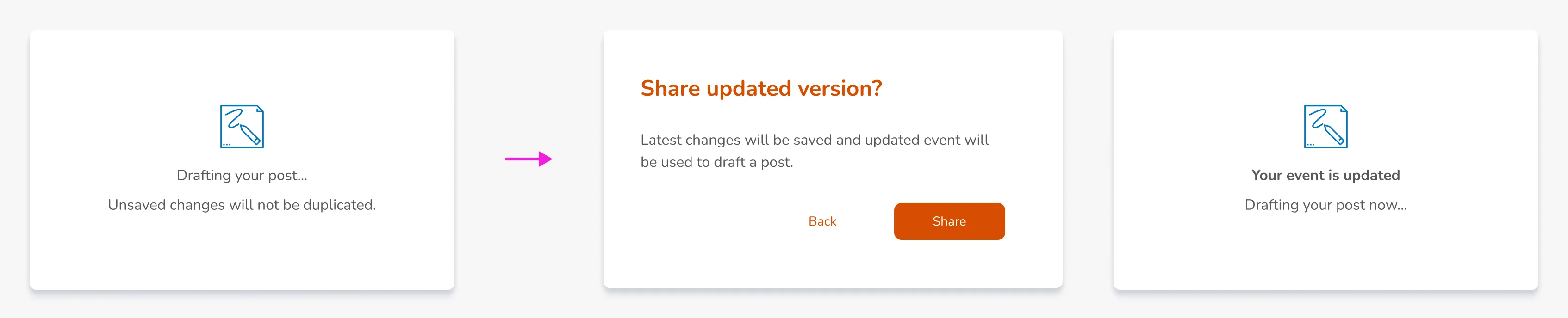
User feedback on the new flow was overwhelmingly positive.
Even in a scrappy startup, you have to be selective about what you test, but I learned that high-impact edge cases still need to be tested.
Making tradeoffs
One of the toughest workflows for schools was user management because SkoolBag stored only parent data, not students.
Each year, multiple schools update their parent lists, deleting all records and reuploading a new CSV. This bulk upload feature existed in the legacy console and schools relied on it.
I was now redesigning bulk user upload for the new console.
Reuse over Reinvent
This story sums up startup life perfectly:
- 10:00 - I presented a design in a feature review
- 10:20 - Dev suggested reusing an existing component from our stack instead
- 11:00 - I weighed both options, saw the benefits and redesigned the flow.

Once engineering started building, we hit a major unexpected constraint.
bookmarkSystem couldn’t handle rendering thousands of editable fields in the browser.
Reliability over Customisation
Together, we explored alternatives and quickly pivoted to a simpler, more scalable flow: we only show a summary of the results.
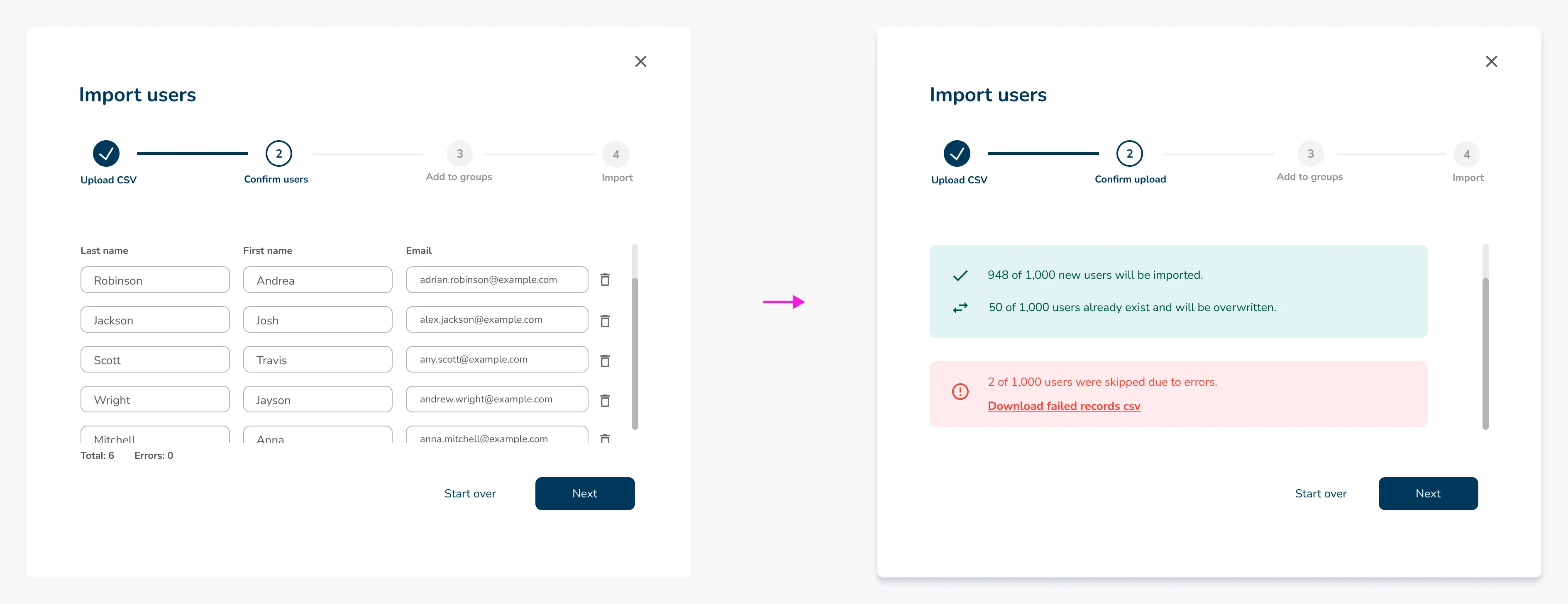
The flow worked reliably and scaled well for large files.
We didn’t receive complaints or support tickets after launch and admins were able to complete bulk uploads without issues.
It taught me to involve engineering earlier when designing data-heavy features and to treat technical limits as part of the design challenge.
Failed adoption
One of the biggest admin pain points was updating user groups each year.
Some schools solved this by uploading new CSV files, while others just relied on parents to do the right thing and update their groups.
We explored a lot of different options to solve that user pain. One of my initiatives was a lightweight “Assign groups” feature that let admins bulk-move users directly in the UI without needing spreadsheets.
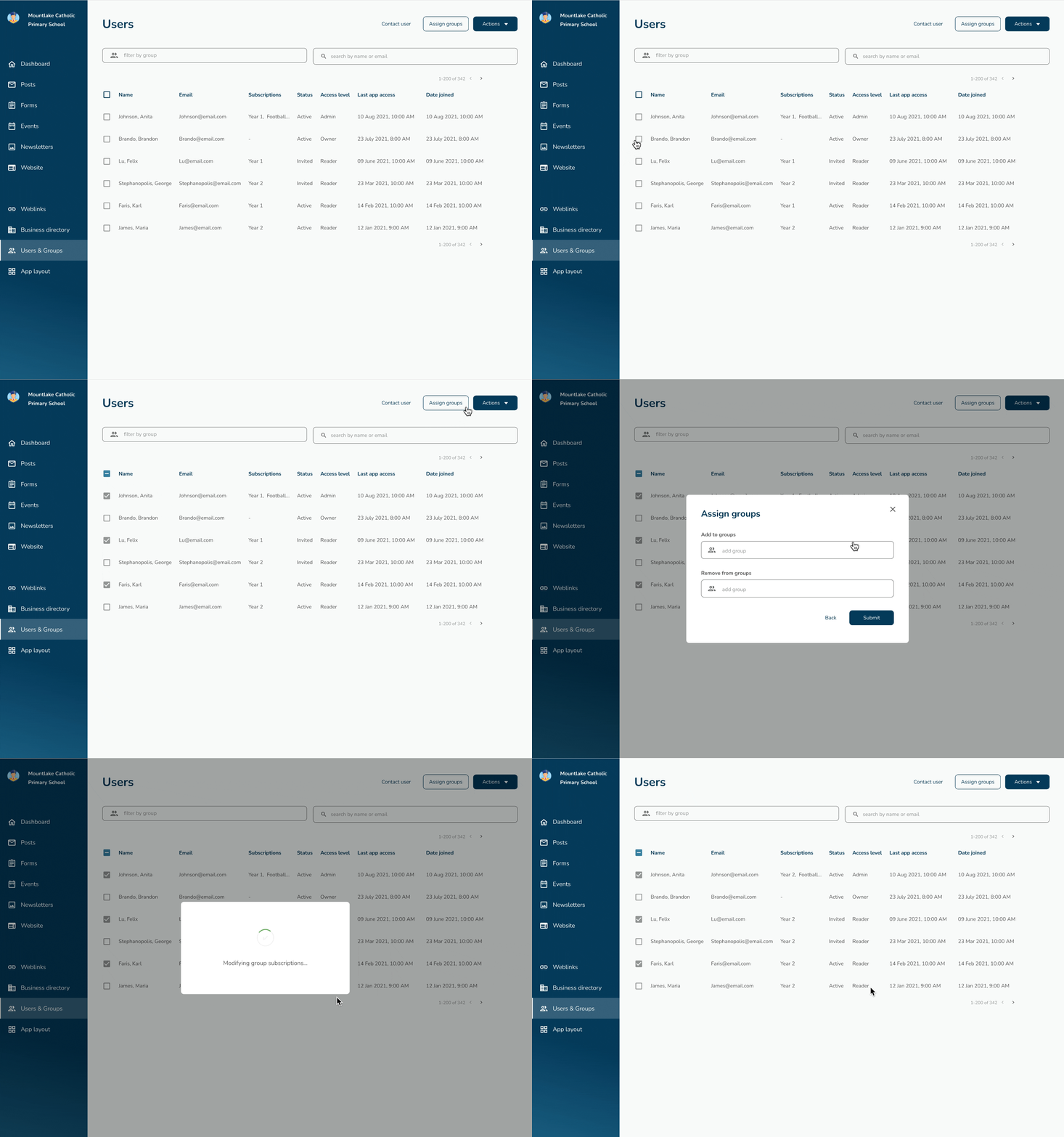
bookmarkThe tool worked as intended, but adoption was lower than expected.
This was not a legacy feature for them, so they hesitated to use it. They didn’t understand how it fit into their existing workflow.
To help with adoption, I created a training video.
Looking back:
- If I had more time, I’d validate the solution with real users before release.
- I also would’ve planned for behaviour change, not just problem-solving.
Solving a user problem isn’t enough. You also need to plan the onboarding and shape habits if you want a new solution to replace an old one.
Rebuilding trust
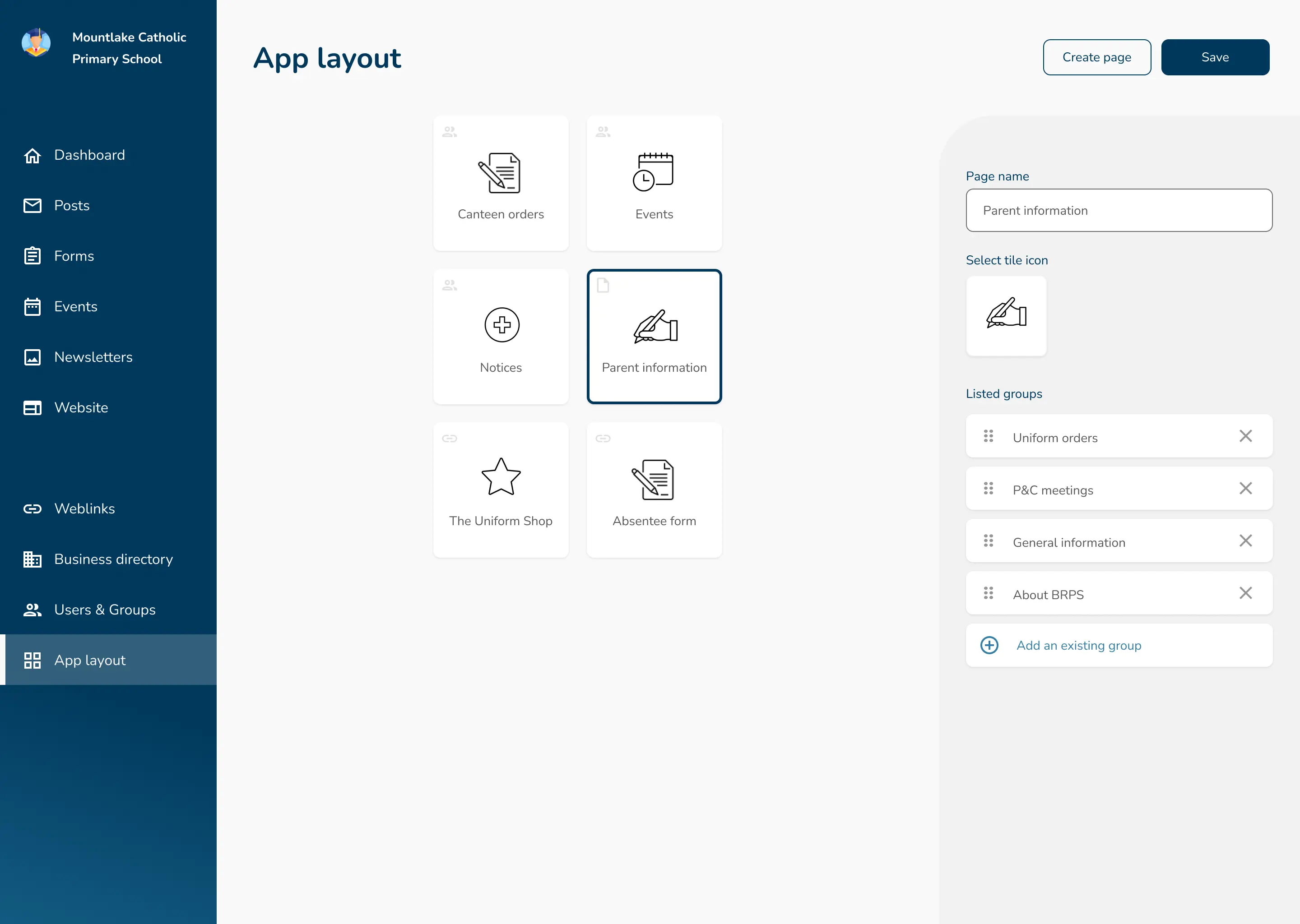
After the migration, the app layout broke from a user perspective.
All tiles had the same color and icon, sub-tiles split into tiles and they could be reordered. Schools that had spent years carefully structuring their app were frustrated and some even considered leaving.

The PM proposed a quick fix to enable reordering, but that wouldn’t solve the real problem: admins needed to rebuild the structure.
bookmarkWe needed a scalable solution that could handle the layout complexity.
I designed a full layout tool that lets admins drag and drop tiles, group and nest items, change icons and customise colours.
Impact
- Over 80% of schools customised their layout within the first month
- Post-launch feedback turned positive
- Several schools that were considering churn decided to stay
Migration Impact
- Migrated 1,000+ schools to a new console without loss of functionality.
- Increased adoption of key features by 25%.
- Enabled new revenue streams and partnership opportunities.
Key learnings
My time at SkoolBag was formative. It shaped me as a design leader, giving me the opportunity to wear multiple hats and work closely with the team every day. It taught me to be pragmatic and focus on what truly matters right now.
Without formal design mentorship, I learned by doing: solving real problems, making mistakes and iterating on processes and solutions. That experience grounded me in practicality and ownership and I’m deeply grateful for it.